Resource 05, free. AI for Professionals, advisers edition
Retire at 60 or 65? Let the client drag the slider.
A scenario calculator for Australian financial advisers to use with clients. Move the sliders and watch the year the money runs out move with them. Below it is the prompt to build your own in ChatGPT, Claude, Gemini or Copilot.
Illustration only, not financial advice. Excludes tax, fees and the Age Pension. Fictional example.
Clients nod at projections on paper. When they drag a slider from 65 to 60 and watch the line reach zero thirteen years earlier, the conversation changes. This is the shape of it, on a fictional couple.
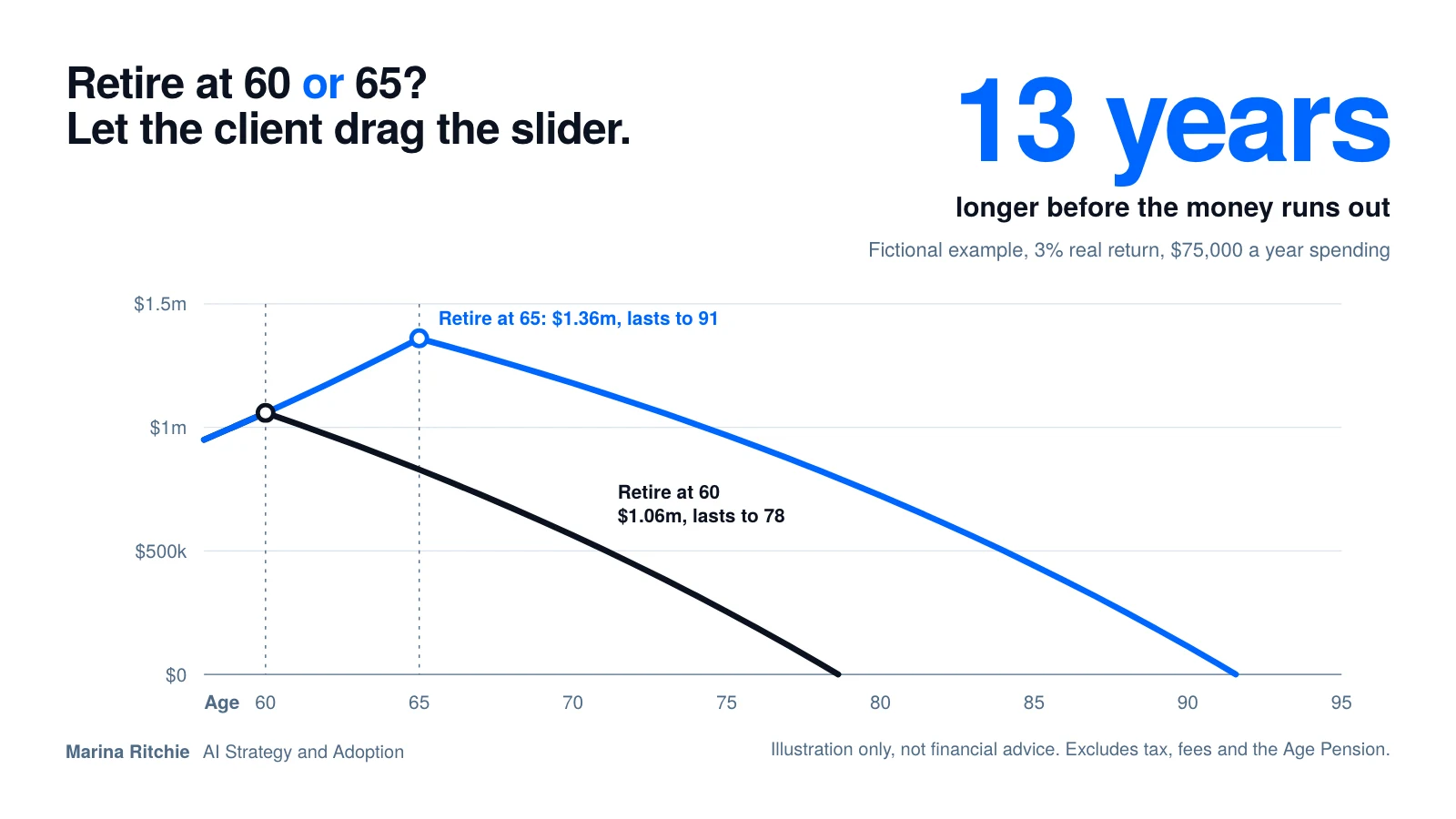
The calculator
The figures in the first block apply to both scenarios. All amounts are in today's dollars, and the return is the real return after inflation. Each scenario then has its own retirement age.
The client today
Scenario A
Retire at 60
Balance at retirement
Money runs out at about
Scenario B
Retire at 65
Balance at retirement
Money runs out at about
Super balance, year by year
Retire at 60Retire at 65
Lines run from the client's current age to age 95. Dotted markers show each retirement age. A line that reaches the bottom axis means the balance has run out.
Illustration only, not financial advice. Excludes tax, fees and the Age Pension. Fictional example. The model applies a fixed real return every year, with contributions until retirement and spending after it. It ignores sequencing risk, changing spending and minimum drawdown rules.
Build your own in ChatGPT, Claude, Gemini or Copilot
Paste this prompt into your assistant to build a similar tool in the chat. The numbers should match this page. The layout will not, because each assistant designs its own.
- Open your assistant and start a new chat. ChatGPT, Claude and Gemini can build interactive tools in the chat. Copilot and Grok vary by plan.
- Paste the prompt below, then enter the client's stated figures when it asks, or edit the starting values first.
- Check the numbers against this page. The prompt includes two check figures. If they differ, ask the assistant to show its formula.
- If you get a table instead of sliders, ask for an interactive version, or use this page in the meeting instead.
Build an interactive retirement scenario tool here in the chat for a client meeting. Sliders: retirement age (55 to 70), current combined super ($), annual contributions until retirement ($), extra voluntary contributions ($ per year), annual spending in retirement in today's dollars ($), and real return after fees and inflation (% per year). Start at age 58. Calculate year by year: until retirement, balance = balance x (1 + return) + contributions; after retirement, balance = balance x (1 + return) minus spending. Show a line chart of the balance to age 95, the balance at retirement, and the age the money runs out (if it does). Add a toggle to compare two retirement ages side by side. Put this at the top in bold: "Illustration only. Not financial advice. Excludes tax, Age Pension and fees unless stated. Returns are not guaranteed." Use plain English labels. Starting values: super 950000, contributions 25000, extra 0, spending 75000, return 3%, retirement age 65. Check: with these values, retiring at 60 should give about $1.06m at retirement lasting to about age 78, and retiring at 65 about $1.36m lasting to about age 91. If your numbers differ, show your formula.
-
Let the client move the slider
Hand over the retirement age control and say nothing for a moment. Watching the run-out age shift by more than a decade does more than a page of projections.
-
Start from their numbers, not the defaults
Enter the client's stated balance, contributions and spending before the meeting, and check the results against your own modelling so there are no surprises on screen.
-
Say what the tool leaves out
Name tax, fees, the Age Pension and market sequence risk out loud. The point is the shape of the trade-off, not the exact year.
-
Record it as an illustration
Note in the file what was shown and that it was illustrative. Formal modelling and advice go through your usual process and your licensee's requirements.
Retirement age is one example
An interactive calculator does something a document cannot. It shows the value of a decision, puts the options side by side, and lets the client make the choice with their own hands. The same pattern works for any decision a client faces: one service against another, an offer against doing nothing, a scenario with a few moving parts.
Take the prompt above, change the inputs and the formula, and you have a new tool. To have every tool come out in your own colours and fonts, use the practice brand skill. If you would like a hand building one for your practice, email hello@marinaritchie.com.
The calculator is the easy part.
One real AI use case a day, with the tool to go with it. If your practice is trying to work out which AI uses are actually worth adopting, that is the work I do.
Not ready to book? Email hello@marinaritchie.com and start the conversation.